

# Session 4 - set up the project. Run this on the Pi, over SSH.
sudo apt update
sudo apt install -y python3-venv

mkdir ~/piweb && cd ~/piweb
python3 -m venv .venv
source .venv/bin/activate

pip install django RPi.GPIO

django-admin startproject controller .
python manage.py startapp hardware# hardware/gpioHw.py - everything that touches a pin, in one place.
#
# A web app is many short-lived requests, and GPIO.setup() is not something to
# run on each one. So the pins are configured once at import, and a background
# thread owns the automatic mode. Views only read and write these variables.
import threading
import time
import RPi.GPIO as GPIO
LED = 17
LDR = 27
GPIO.setmode(GPIO.BCM)
GPIO.setwarnings(False) # the module is imported once per worker
GPIO.setup(LED, GPIO.OUT)
GPIO.setup(LDR, GPIO.IN)
_state = {"led": False, "auto": False, "dark": False}
_lock = threading.Lock() # views and the worker thread both touch _state
def _worker():
while True:
dark = GPIO.input(LDR) == GPIO.HIGH
with _lock:
_state["dark"] = dark
if _state["auto"]:
_state["led"] = dark
GPIO.output(LED, GPIO.HIGH if dark else GPIO.LOW)
time.sleep(0.2)
# daemon=True so Ctrl+C on the dev server actually exits.
threading.Thread(target=_worker, daemon=True).start()
def setLed(on: bool):
with _lock:
_state["auto"] = False # a manual command turns automatic off
_state["led"] = on
GPIO.output(LED, GPIO.HIGH if on else GPIO.LOW)
def setAuto(on: bool):
with _lock:
_state["auto"] = on
def readState():
with _lock:
return dict(_state)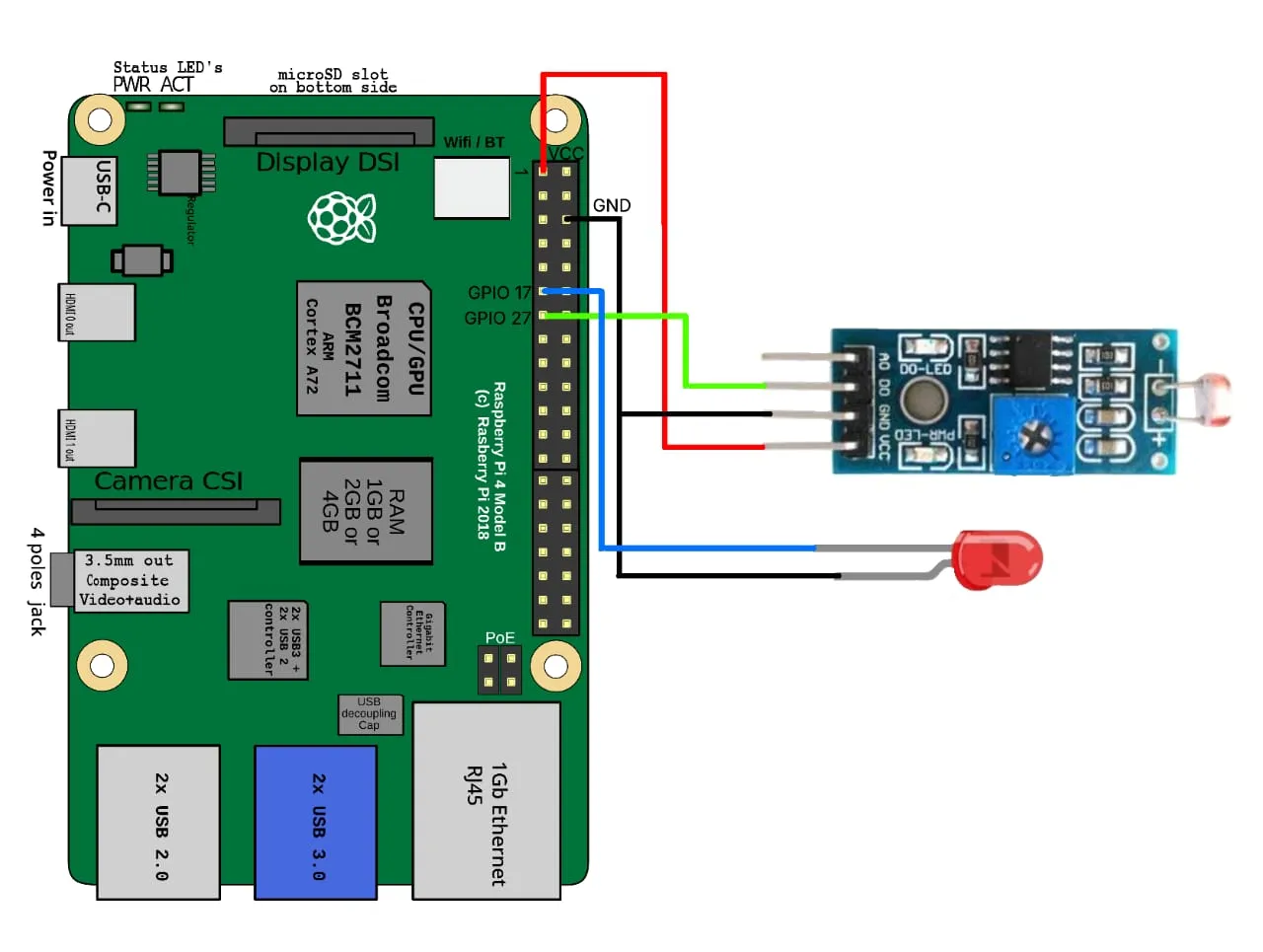
sudo apt update
sudo apt full-upgrade -y
sudo reboot# blink.py - session 2.
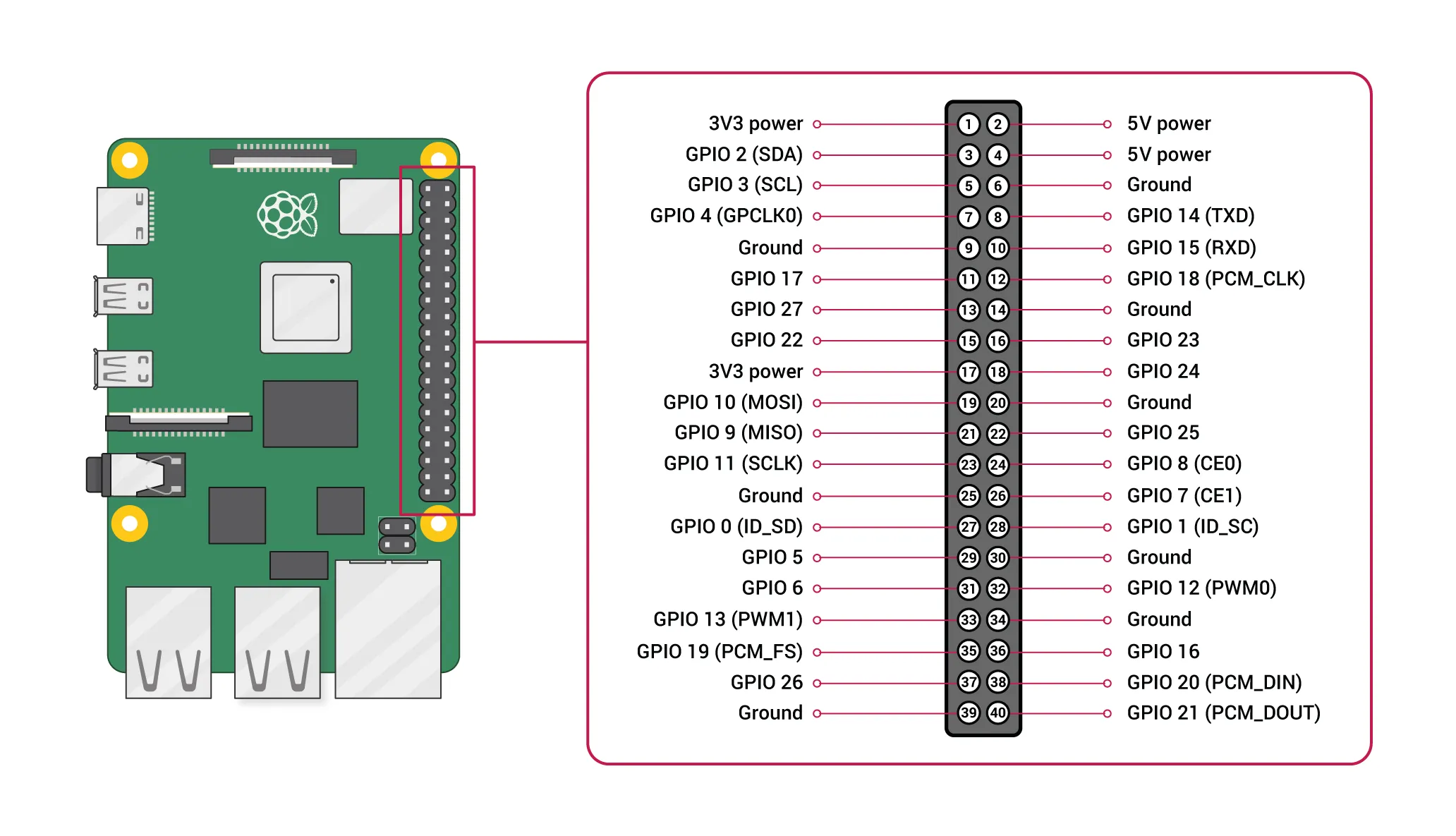
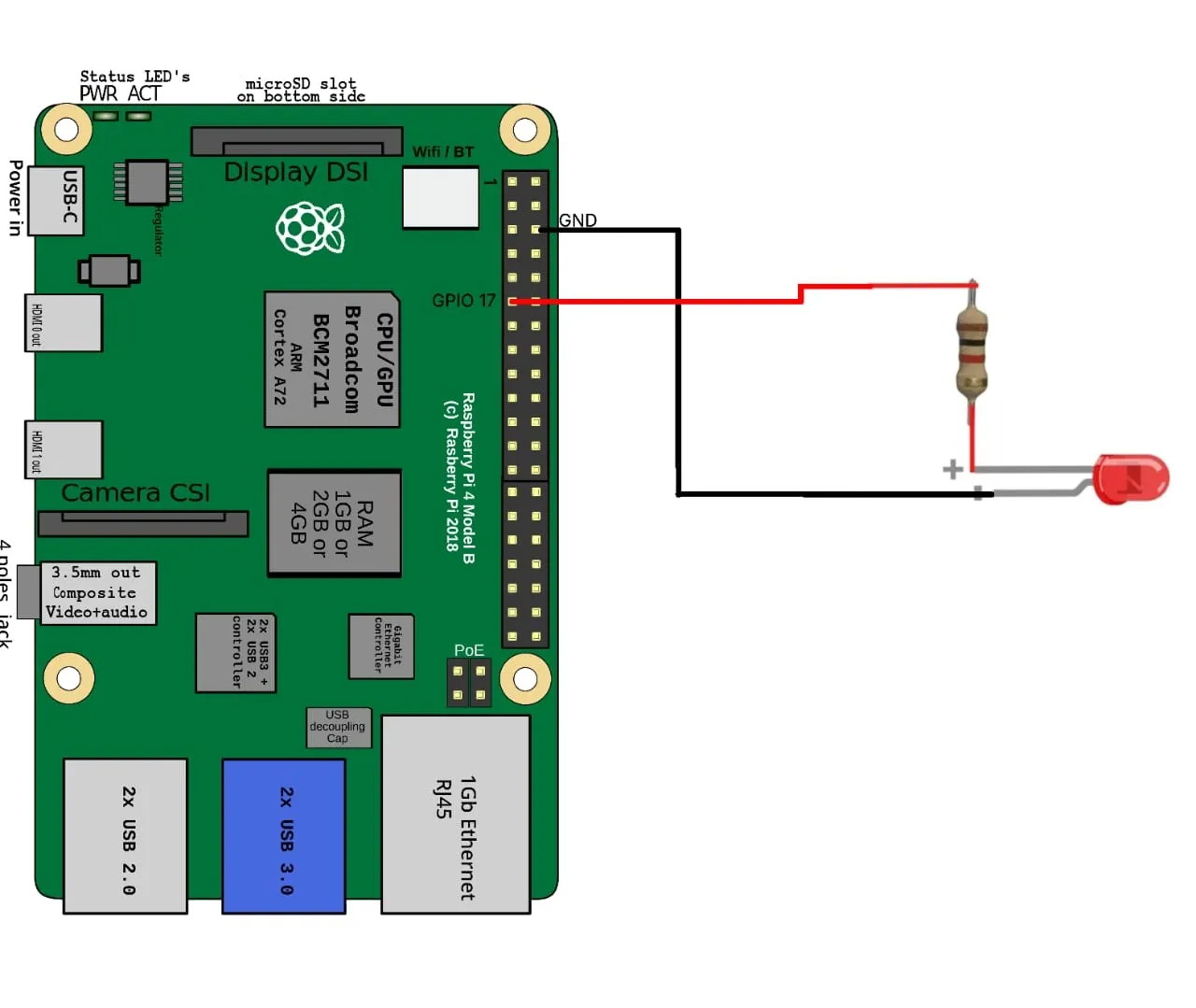
# Wiring: pin 11 (GPIO17) -> 330 ohm resistor -> LED anode;
# LED cathode -> pin 9 (GND).
import RPi.GPIO as GPIO
import time
LED = 17
GPIO.setmode(GPIO.BCM) # number pins by GPIO, not by physical position
GPIO.setup(LED, GPIO.OUT)
try:
while True:
GPIO.output(LED, GPIO.HIGH)
time.sleep(1)
GPIO.output(LED, GPIO.LOW)
time.sleep(1)
except KeyboardInterrupt:
pass
finally:
# Without this, the pin keeps its last state after Ctrl+C and the next
# run warns "This channel is already in use".
GPIO.cleanup()# ldr.py - session 3. LED on in the dark, off in the light.
#
# Uses an LDR *module* (the small board with a potentiometer on it), which
# outputs a clean digital HIGH/LOW. A bare LDR is analogue, and the Pi has no
# ADC - that is why the module is worth the few rupees.
#
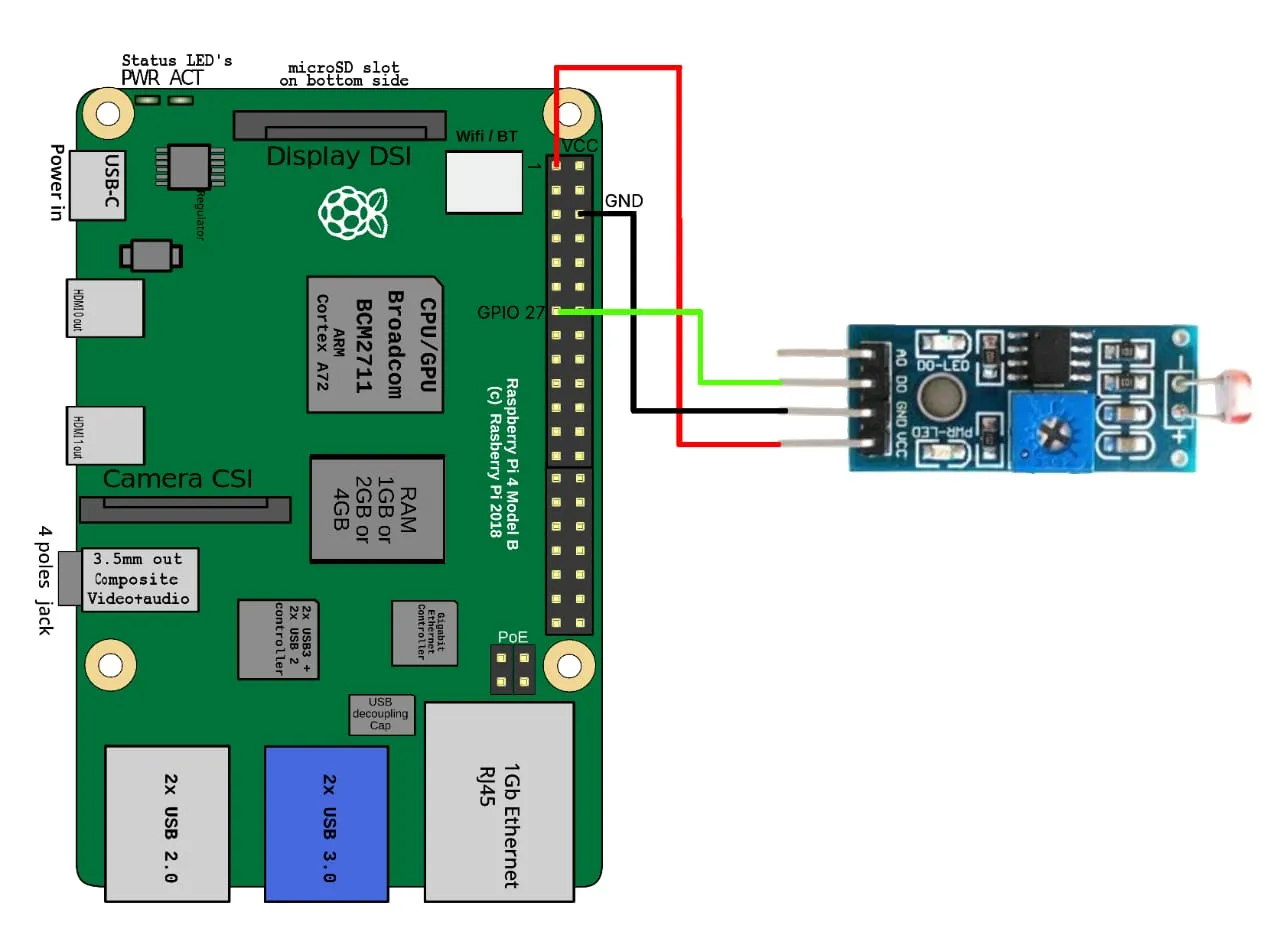
# Wiring: module VCC -> 3.3V, GND -> GND, DO -> pin 13 (GPIO27).
# LED still on GPIO17.
import RPi.GPIO as GPIO
import time
LED = 17
LDR = 27
GPIO.setmode(GPIO.BCM)
GPIO.setup(LED, GPIO.OUT)
GPIO.setup(LDR, GPIO.IN)
try:
while True:
# Most of these modules pull DO LOW when light crosses the threshold
# set by the on-board pot. If yours is inverted, swap the branches.
dark = GPIO.input(LDR) == GPIO.HIGH
GPIO.output(LED, GPIO.HIGH if dark else GPIO.LOW)
time.sleep(0.2)
except KeyboardInterrupt:
pass
finally:
GPIO.cleanup()# hardware/views.py
from django.http import JsonResponse
from django.shortcuts import render
from . import gpioHw
def index(request):
return render(request, "hardware/index.html")
def state(request):
return JsonResponse(gpioHw.readState())
def led(request, action):
gpioHw.setLed(action == "on")
return JsonResponse(gpioHw.readState())
def auto(request, action):
gpioHw.setAuto(action == "on")
return JsonResponse(gpioHw.readState())# controller/urls.py
from django.urls import path
from hardware import views
urlpatterns = [
path("", views.index),
path("api/state/", views.state),
path("api/led/<str:action>/", views.led),
path("api/auto/<str:action>/", views.auto),
]# controller/settings.py - the dev server refuses unknown Host headers.
# For a workshop on a trusted network this is enough:
ALLOWED_HOSTS = ["*"]
INSTALLED_APPS = [
# ...
"hardware",
]<!-- hardware/templates/hardware/index.html -->
<!DOCTYPE html>
<html>
<head>
<meta name="viewport" content="width=device-width, initial-scale=1">
<title>Pi Control</title>
</head>
<body style="font-family: sans-serif; text-align: center; padding-top: 2rem">
<h1>Raspberry Pi Control</h1>
<p>LED: <b id="led">?</b> Light: <b id="dark">?</b> Auto: <b id="auto">?</b></p>
<p>
<button onclick="send('/api/led/on/')">LED on</button>
<button onclick="send('/api/led/off/')">LED off</button>
</p>
<p>
<button onclick="send('/api/auto/on/')">Auto on</button>
<button onclick="send('/api/auto/off/')">Auto off</button>
</p>
<script>
function paint(s) {
document.getElementById('led').textContent = s.led ? 'ON' : 'OFF';
document.getElementById('auto').textContent = s.auto ? 'ON' : 'OFF';
document.getElementById('dark').textContent = s.dark ? 'dark' : 'bright';
}
function send(url) { fetch(url).then(r => r.json()).then(paint); }
// Poll, so the page follows the LED when automatic mode changes it.
setInterval(() => fetch('/api/state/').then(r => r.json()).then(paint), 500);
</script>
</body>
</html># Let other machines on the network reach it - the default only binds
# localhost, which on a headless Pi means nothing can connect.
python manage.py runserver 0.0.0.0:8000
# Then open http://<your-pi-ip>:8000/ from any device on the same network.